Home › Unity tools › Bug Capsule
Bug Capsule
In-game bug reports: F8, draw on the screenshot, press Send. Log, inputs, system and build arrive in a folder, Discord, your webhook or a GitHub issue.
Coming soon Version 1.0.0 is submitted to the Unity Asset Store and in review; the store link goes here when it is live. Launch price 29.99 USD, 50 percent off for the first 2 weeks after release.
What it does
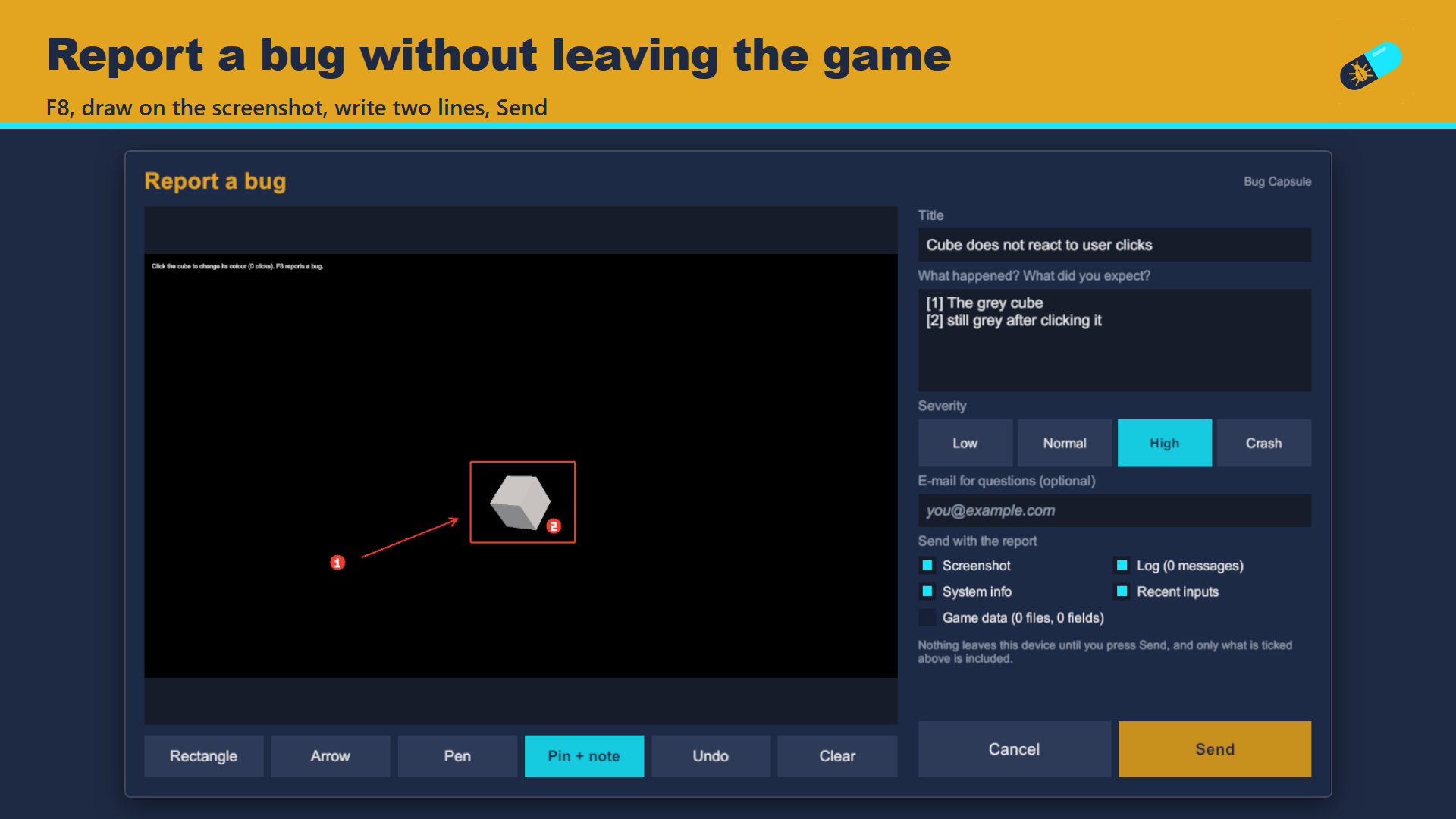
Players and testers find bugs and then describe them in a chat line from memory, with no log, no build number and a phone photo of the monitor. Bug Capsule puts the report inside the game: they press F8 (or tap with three fingers), the game freezes politely, and a panel shows the moment the key was pressed.
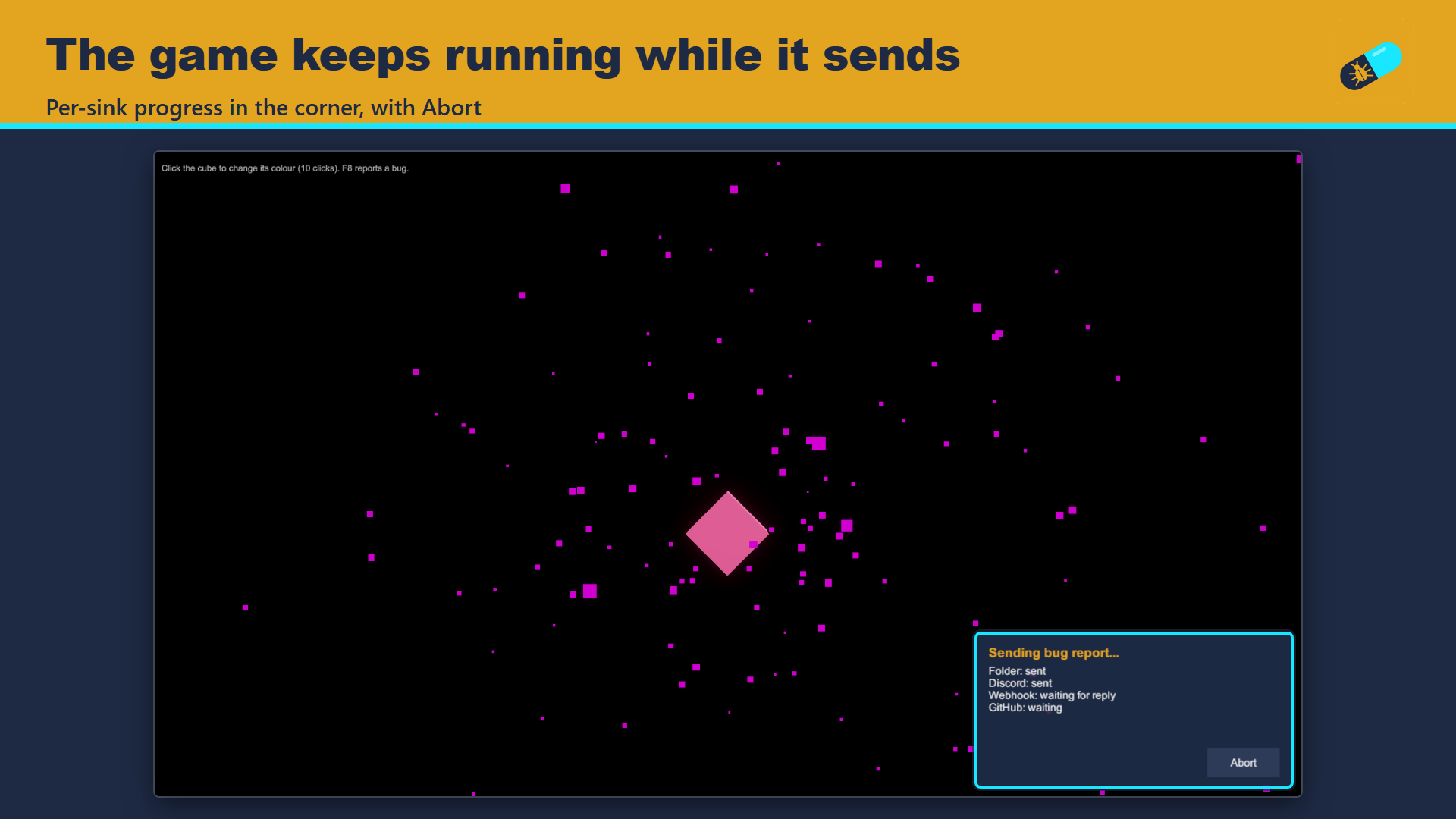
They draw on the screenshot with rectangles, arrows, a pen and numbered pins that add matching lines to the description, write a title, pick a severity and press Send. The panel closes at once and the game keeps running while a small window in the corner shows the upload.
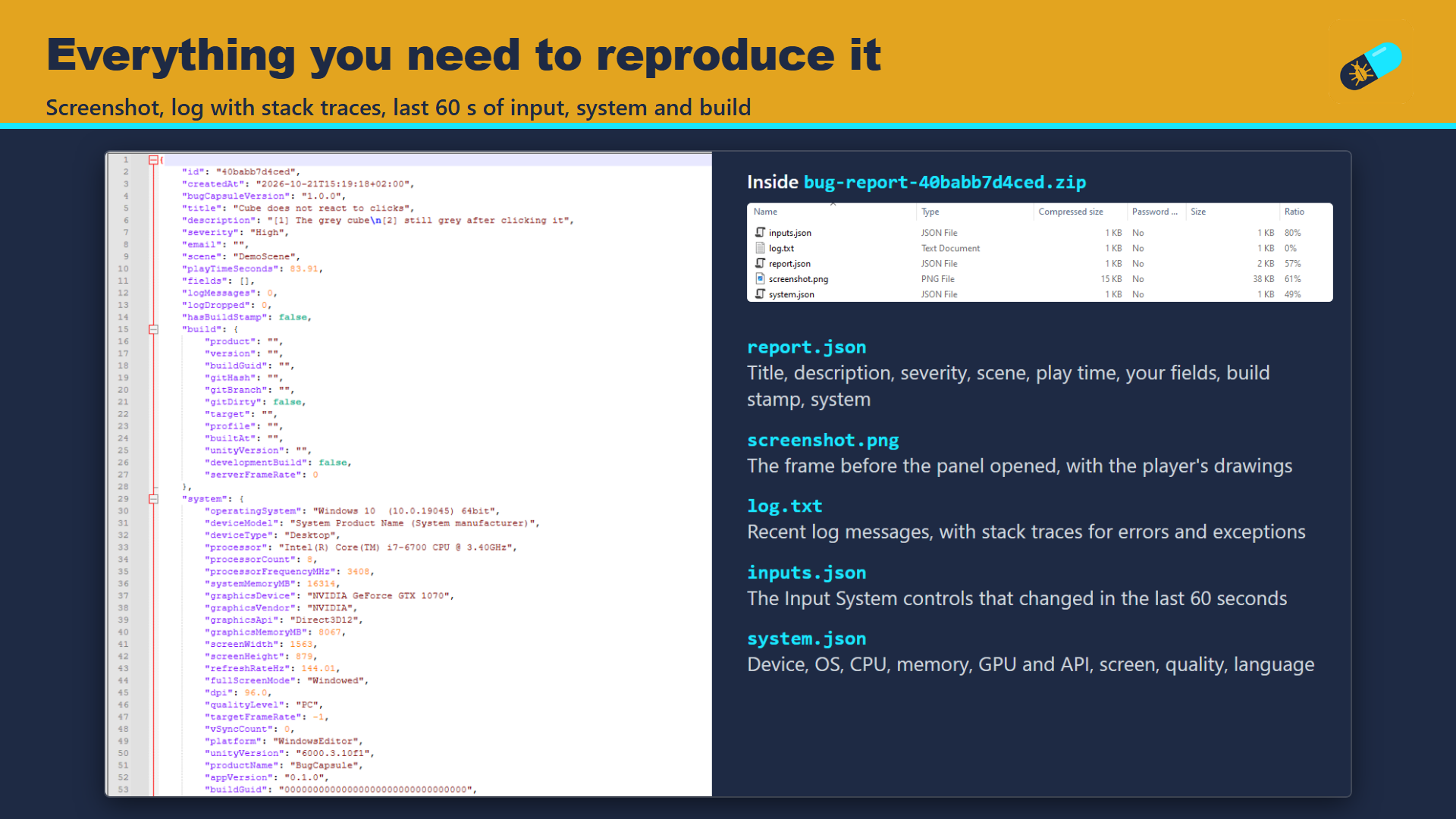
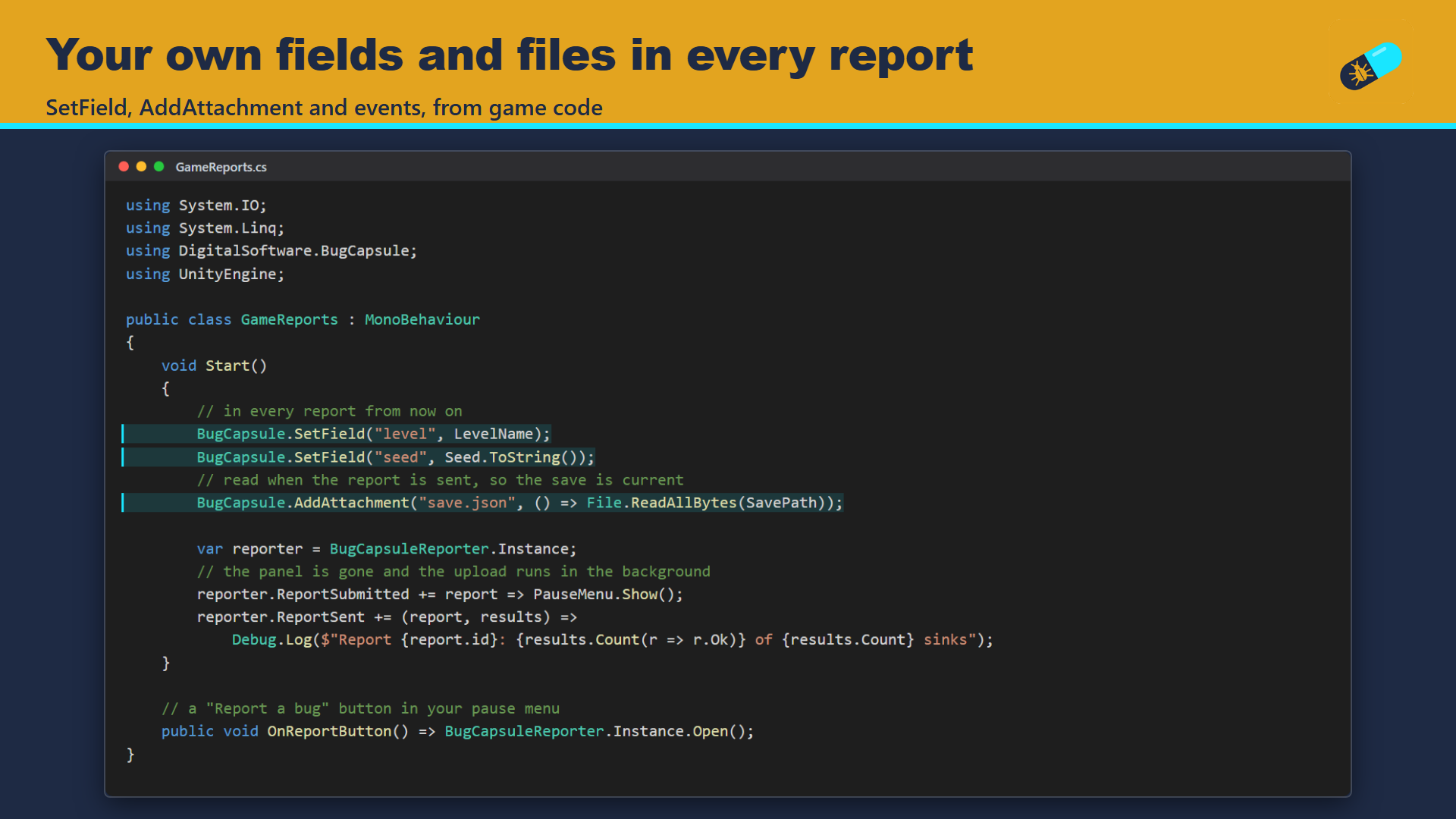
Each report carries the screenshot, the recent log with stack traces (kept from the start of the game, so the messages before the key press are there), the Input System controls of the last 60 seconds, a system snapshot, the scene and play time, your own fields and attachments such as a save file, and the build stamp (version, git hash, build time) when the build has one. The player sees what is included and can untick any part; nothing leaves the device before Send.
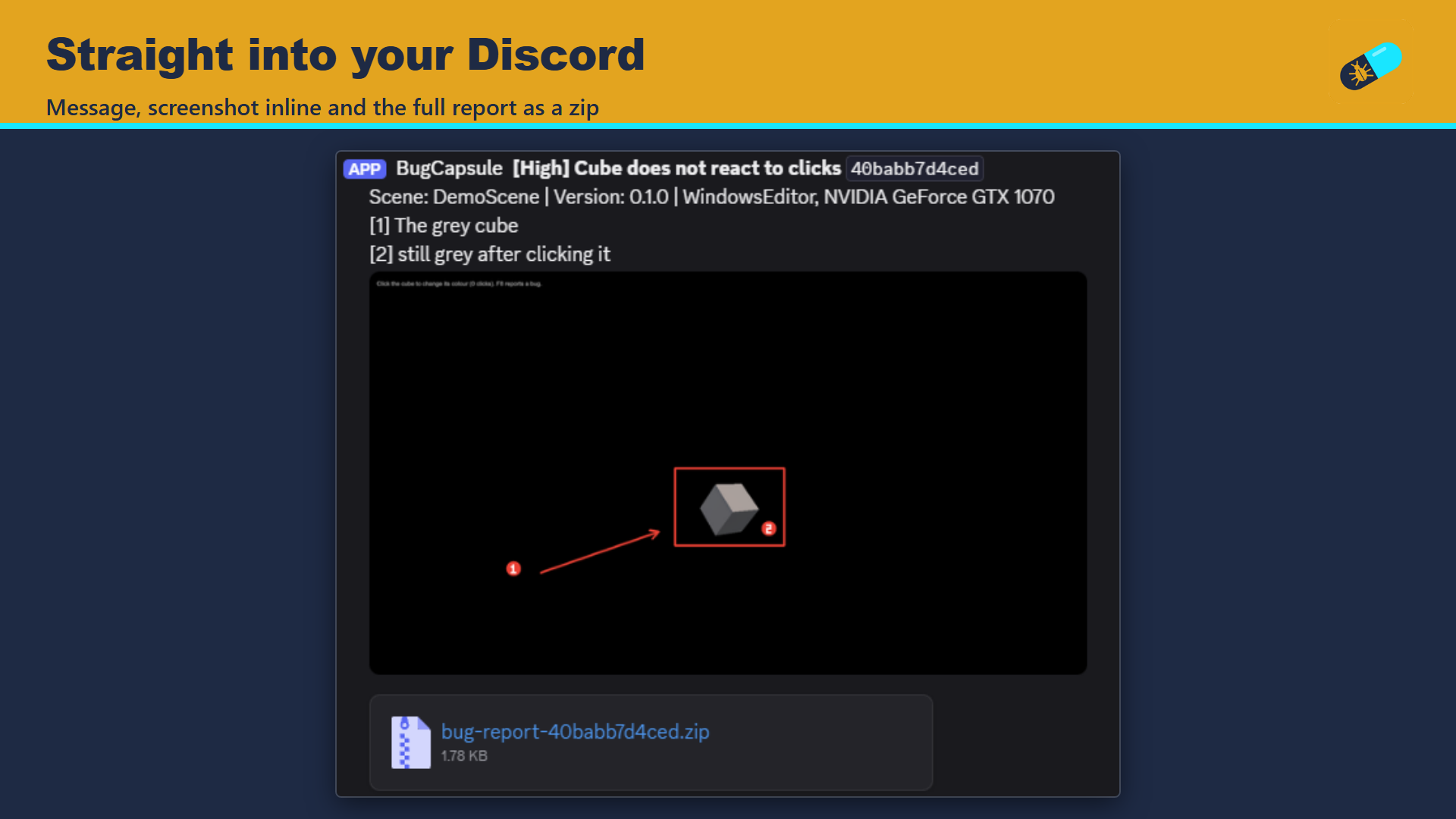
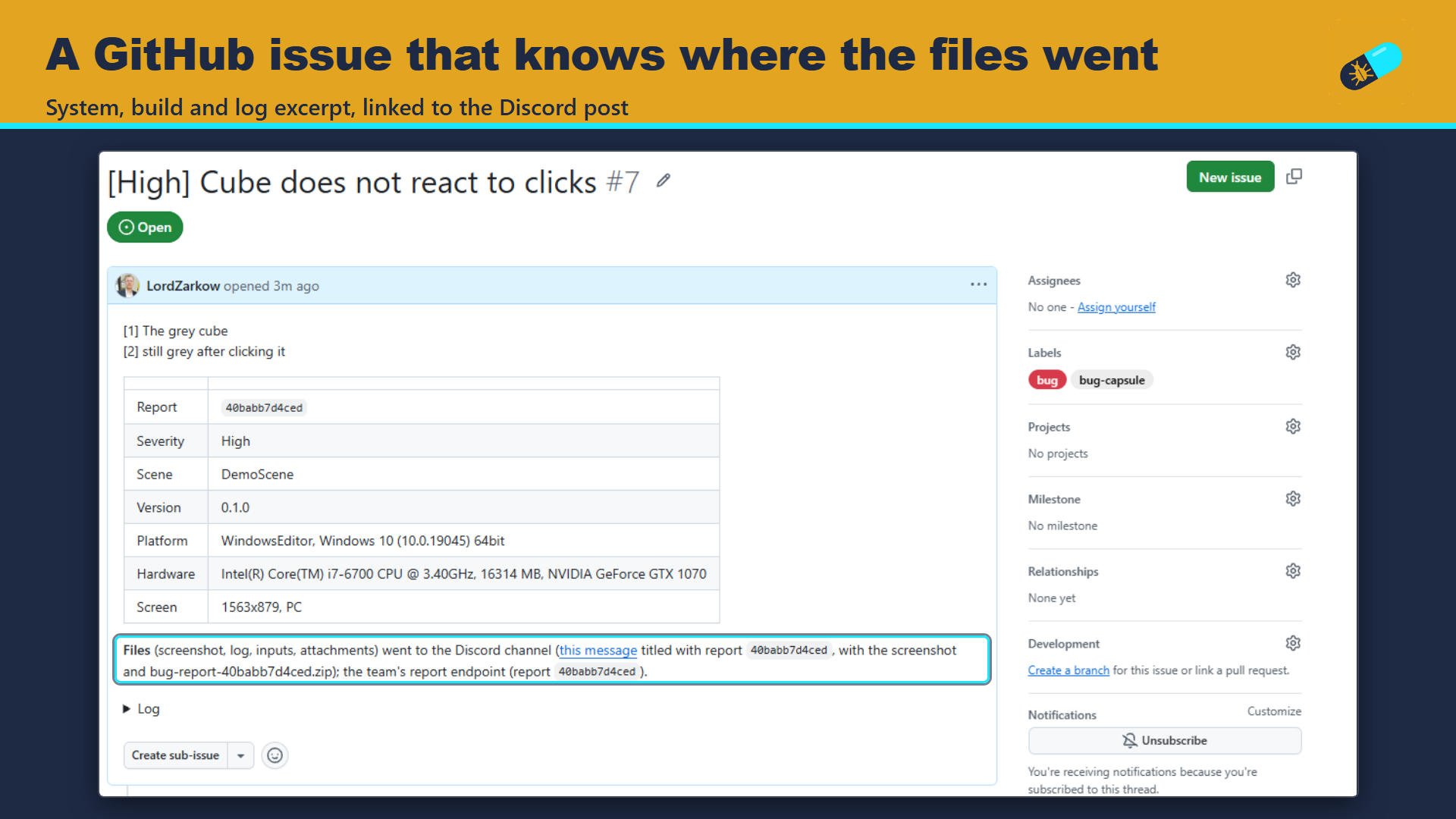
Reports go to any mix of: a folder on the device, a Discord channel (message, screenshot shown inline, zip), your own web endpoint (multipart POST, ready for a relay to Jira, Trello or anything else) and a GitHub issue that links the Discord message. Every report has a short id that appears in all of them.
Discord posts are kept safe and within limits: player text is cleaned so no report can ping your server, long text is cropped with a note, and packages stay under Discord's 10 MB with the screenshot downscaled to JPEG only when needed. A package size limit trims the input trace, then the log, then attachments, and says what was trimmed.
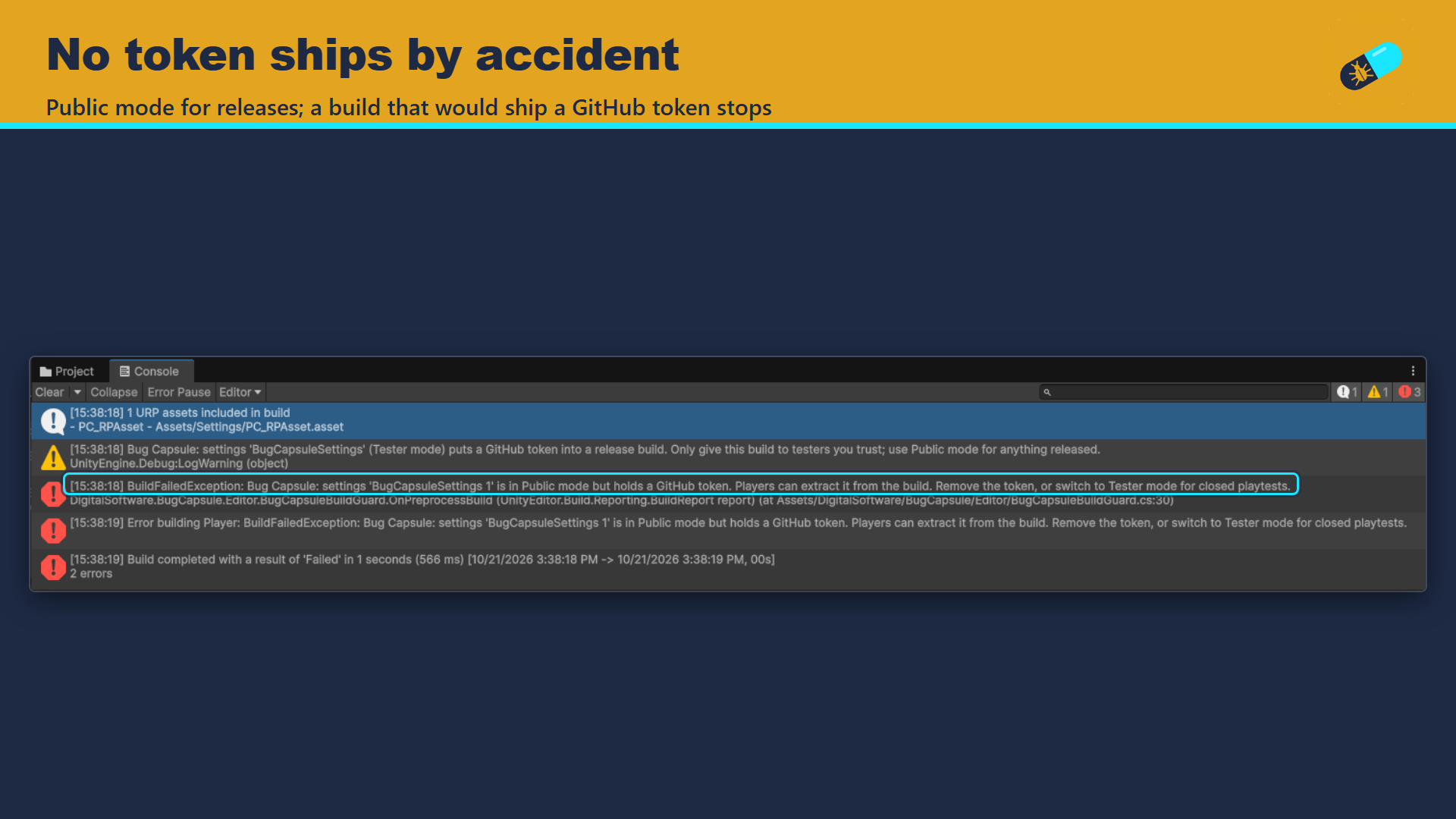
Secrets are handled with care. Public mode, the default for released builds, never uses tokens. Tester mode adds GitHub for closed playtests. A build guard stops any build that would ship a GitHub token in Public mode, and warns about a Tester-mode token in a release build.
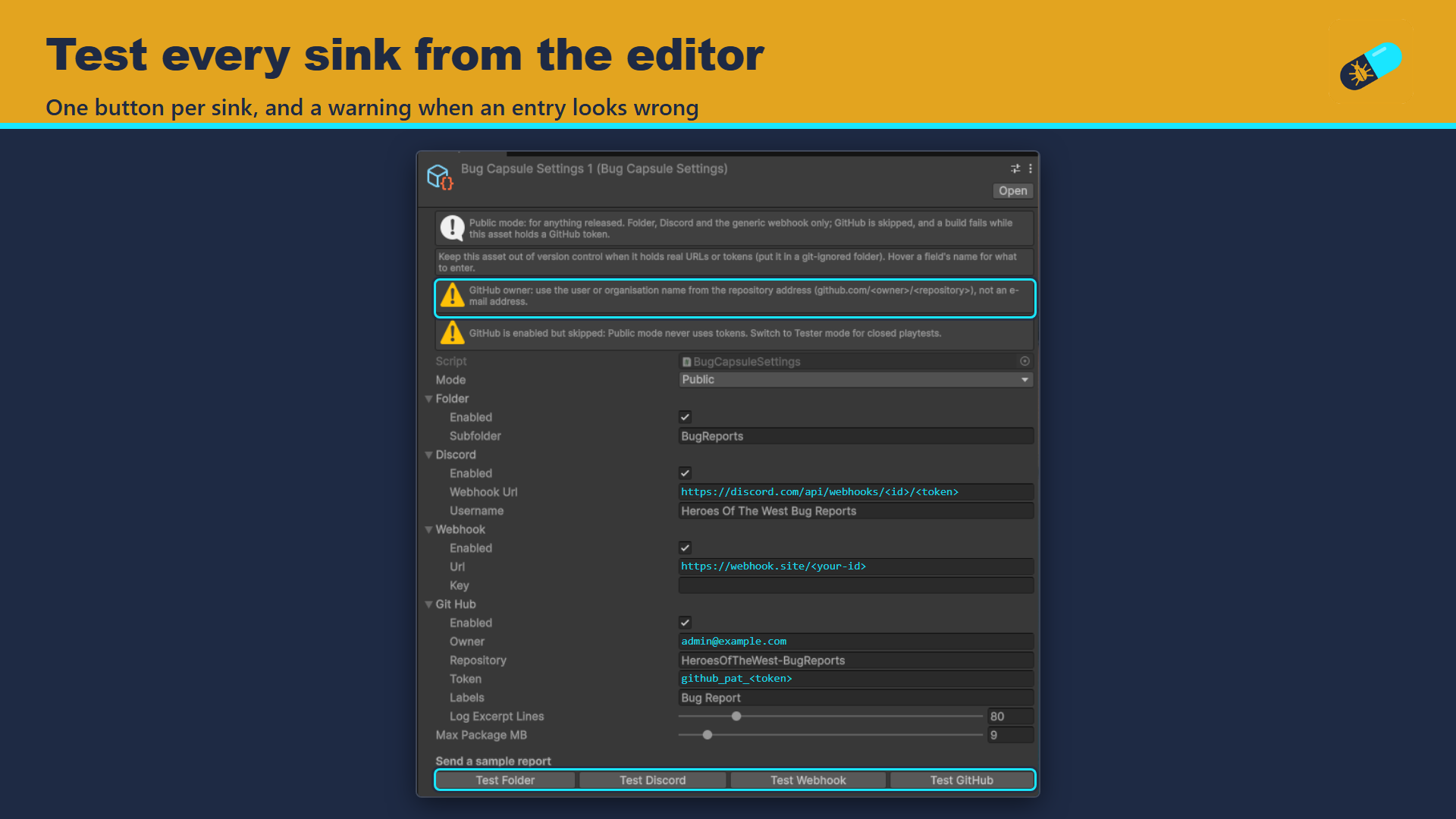
The panel is built from code: any scene, any render pipeline, no TextMeshPro. Cursor lock, cursor visibility, time scale and the EventSystem are put back exactly as they were. Each sink has a Test button in the settings inspector, and the inspector flags entries that look wrong.
Key features
- In-game report panel on F8, a three-finger tap or your own button
- Draw on the screenshot: rectangle, arrow, pen, numbered pins, undo
- Screenshot, log with stack traces, 60 s input trace, system snapshot, custom fields and attachments
- Sinks: device folder, Discord, your webhook, GitHub issue; one report id across all of them
- Sends in the background with per-sink progress and Abort; the game keeps running
- Player text cleaned for Discord, 10 MB limit respected, package trimming that says what it cut
- Public and Tester token modes with a build guard against shipped tokens
- Game state restored exactly: cursor, time scale, EventSystem
- Works with the Input System or the old Input Manager; Enter Play Mode without domain reload supported
- Build stamp (build-info.json with version and git hash) shown in every report
Screenshots
Technical details
Runtime component and editor tools in their own assembly definitions. Unity 6.3 LTS (6000.3) and newer. UI built from code with Unity UI (uGUI); no TextMeshPro. The report panel needs a landscape screen, 16:9 or wider; portrait is not supported in 1.0.0. Input System 1.0 or newer optional (needed for the input trace); the old Input Manager also works. Network sinks use UnityWebRequest. WebGL: Discord, GitHub and webhook sinks work from the browser; your own webhook endpoint must allow cross-origin requests (CORS). No other dependencies. Any render pipeline. Source included.
| Built-in RP | URP | HDRP | Minimum Unity | Price |
|---|---|---|---|---|
| yes | yes | yes | 6000.3 | 29.99 USD |
Release notes
1.0.0 2026-10
- Capture: screenshot taken at the end of the frame before the panel opens, optionally scaled; recent log messages from a thread-safe ring capped by count and size; system and application snapshot; Ship It's build-info.json stamp when present.
- Game state guard: cursor lock, cursor visibility and time scale saved when the panel opens and restored exactly when it closes; when the scene has no EventSystem, one is added while the panel or the send window is showing, so their buttons work, and removed afterwards.
- BugCapsule.SetField and BugCapsule.AddAttachment from game code; static state reset at SubsystemRegistration (Enter Play Mode without domain reload).
- Report panel built from code (any scene, any render pipeline, no TextMeshPro needed): title, description, severity, optional e-mail (remembered), "send with the report" toggles and a privacy line.
- Drawing on the screenshot: rectangle, arrow, pen and numbered pins that add matching notes to the description; undo and clear.
- Opens with F8 (Input System binding or legacy key) or a three-finger tap on touch screens; BugCapsuleReporter.Open() for a pause-menu button.
- Input trace: the last 60 seconds of Input System controls that changed, pointer motion optional.
- GameObject > Digital Software > Bug Capsule Reporter adds the reporter to a scene.
- Sinks: a local folder (files plus a zip), a Discord channel (message, screenshot shown inline, zip), your own webhook (multipart POST, optional shared-secret header) and a text-only GitHub issue that says where the files went. File sinks run first; a failing sink never stops the others.
- Size limit for the package (default 9 MB, under Discord's 10 MB): the input trace, then the log, then attachments, largest first, are trimmed to fit, and the report says what was trimmed.
- Token modes: Tester (every sink, for closed playtests) and Public (folder, Discord and webhook only). A build fails when a Public-mode settings asset holds a GitHub token; a Tester-mode token in a release build is a warning.
- Bug Capsule Settings asset (Create > Digital Software > Bug Capsule Settings) with a Test button per sink that sends a sample report from the editor.
- Sending happens in the background: the panel closes on Send and a small window in the corner shows each sink (connecting, sending with percent, waiting for reply, sent, failed) with Abort; no timeout of our own. Events ReportSubmitted (pause or open a menu here if you like) and ReportSent; BugCapsuleReporter.AbortSend() for games with a locked cursor.
- Discord: player text is cleaned (no '@', no control or invisible characters) and cropped with a note saying so; always within Discord's 10 MB upload limit, with the screenshot sent as a downscaled JPEG when the PNG is too big. Pings are also switched off with allowed_mentions.
- Screenshots are kept at 8K at most per side.
- When the game's own ReportSubmitted or ReportSent handler throws, Bug Capsule keeps an error report and sends it when the game quits (desktop), otherwise at the next start.
Documentation and support
- Documentation (PDF), the manual that ships inside the package
- Questions and bug reports: community forum or Discord
- E-mail: contact@digitalsoftware.se
Guides
- Unusable playtest bug reports? Capture them inside your Unity game: What a usable playtest bug report contains, where each piece comes from in Unity 6, and how to capture and send it from inside the game, with C# snippets.
Other packages from Digital Software
- Ship It (coming soon)
- Static State Auditor (coming soon)
- Static State Auditor Pro (coming soon)
- Dedicated Server Build Button (coming soon)
- zCache
- Fast RTS Minimap
- zFPS
- zFPS Pro
- zASCII
Page generated 2026-10-29 from the package's store copy and changelog (version 1.0.0).